Anybody have recommendations for computer techs?

Hi everyone.
Anybody have recommendations for computer techs
The fan in my computer is no longer working. I am afraid my motherboard will fry under the conditions. Its not particularly hot in my apartment, but still.
I have 3 questions:
1) Does anyone know of a reputable computer technician whom I can take my computer to or whom can come to my home and install a new fan?
2) How long will I be able to use my computer without a fan, or should I be using it at all?
3) my computer won't start without altering me that it's running without a fan. Will this eventually trigger my computer to refuse to run without a fan?
Thanks so much!
Anybody have recommendations for computer techs
The fan in my computer is no longer working. I am afraid my motherboard will fry under the conditions. Its not particularly hot in my apartment, but still.
I have 3 questions:
1) Does anyone know of a reputable computer technician whom I can take my computer to or whom can come to my home and install a new fan?
2) How long will I be able to use my computer without a fan, or should I be using it at all?
3) my computer won't start without altering me that it's running without a fan. Will this eventually trigger my computer to refuse to run without a fan?
Thanks so much!
Comments
-
you should not use your computer without the fan. You risk frying the cpu chip and/or mother board.
you are likely best off financially bringing the CPU to the place where the tech guy works, not having him come to you.
Sorry, I don't have a recommendation for said tech guy. -
depends on the fan.
if its the fan for the processors, then dont even turn on the computer until its fixed.
If its a regular fan on the case itself, just open up the case for now. Hell, may as well get some compressed air and clean out the dust.
seriously. -
TAMSIR.
-
Subject: DIY fan replacement
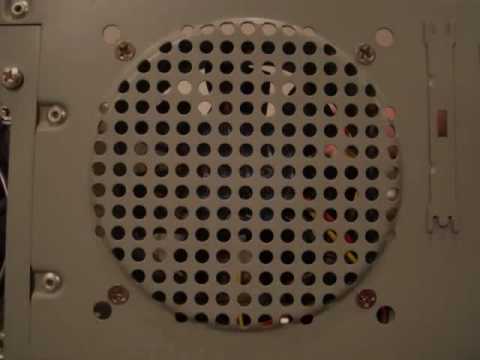
If it's the "case fan" (the big one that pulls air in through the grating on the back side of the PC), you can save time and money by replacing it yourself:- Check out this video:
 It gives a quick walkthrough of the process.
Open up the PC case -- simple as unscrewing the cover. Take a look at your existing fan and how it's connected (plugged in).
Pick up a fan at Staples or Best Buy. A good garden variety fan should
run about $10. E.g. http://www.staples.com/Antec-80mm-TriCool-DBB-Fan/product_584884 is an inexpensive 80mm (about 3") fan (there are also 120mm fans (about 5") -- just measure the size of yours and pick an appropriately-sized replacement).
- Check out this video:
-
It's likely the CPU HS/F - I don't think you'd get a notification/warning if it was just a case fan.
A new heatsink/fan is only going to run you $30 in-store, less online. You don't need a tech to install, just a garden variety nerd will do. The only tools necessary: isopropyl alcohol & a screwdriver (and you may not need the screwdriver). If I had the time, I'd be happy to help, but I'll be going out of town the day after tomorrow.
If you don't know any nerds, I'd try calling that PC place on Flatbush (near 5th, I think). Tell them that you think that you need to replace the CPU heatsink/fan and ask them how much the parts and labor will be. Let them know that you're not going to be overclocking, so you don't need some massive contraption (they can range beyond $50). If they quote over $50 total, fuck 'em. If it's under $30, I'd say to go for it. Between $30/$50, it's your call. -
WhyFi wrote: It's likely the CPU HS/F - I don't think you'd get a notification/warning if it was just a case fan.
Thanks for the reply!
A new heatsink/fan is only going to run you $30 in-store, less online. You don't need a tech to install, just a garden variety nerd will do. The only tools necessary: isopropyl alcohol & a screwdriver (and you may not need the screwdriver). If I had the time, I'd be happy to help, but I'll be going out of town the day after tomorrow.
If you don't know any nerds, I'd try calling that PC place on Flatbush (near 5th, I think). Tell them that you think that you need to replace the CPU heatsink/fan and ask them how much the parts and labor will be. Let them know that you're not going to be overclocking, so you don't need some massive contraption (they can range beyond $50). If they quote over $50 total, fuck 'em. If it's under $30, I'd say to go for it. Between $30/$50, it's your call.
It is in fact the case fan! I opened up the desktop and saw for myself! The bad news is that, It looks like its clipped in there by this plastic clip that you would have to break to remove. I am just too afraid to do so! I am going by there on monday, to find out how much a replacement and installation would cost -
Subject: Re: DIY fan replacement
SlowLoris wrote: If it's the "case fan" (the big one that pulls air in through the grating on the back side of the PC), you can save time and money by replacing it yourself:
thanks for the reply!- Check out this video: It gives a quick walkthrough of the process.
Open up the PC case -- simple as unscrewing the cover. Take a look at your existing fan and how it's connected (plugged in).
Pick up a fan at Staples or Best Buy. A good garden variety fan should
run about $10. E.g. http://www.staples.com/Antec-80mm-TriCool-DBB-Fan/product_584884 is an inexpensive 80mm (about 3") fan (there are also 120mm fans (about 5") -- just measure the size of yours and pick an appropriately-sized replacement).
I couldnt open your Youtube link. Sorry. I want to install it myself, but it just looks like it was clipped on in such a way, that i would have to break it to remove the clips. - Check out this video:
-
Fancy wrote: TAMSIR.
what is tamsir?


Howdy, Stranger!
Categories
- 40K All Categories
- 27.1K Neighborhoods
- 5.1K Crown Heights/Prospect Lefferts Gardens
- 7.1K Prospect Heights
- 2.3K Fort Greene, Clinton Hill, Bed-Stuy
- 8K Park Slope
- 549 Williamsburg, Greenpoint, Bushwick
- 442 Flatbush/Midwood/Ditmas Park
- 657 BoCoCa (Boerum Hill, Cobble Hill, Carroll Gardens)
- 151 Red Hook
- 104 Gowanus
- 304 Bay Ridge/Bensonhurst
- 130 Coney Island, Brighton Beach, Sheepshead Bay
- 270 Brooklyn Heights, DUMBO and Downtown
- 598 Windsor Terrace / Kensington
- 673 Greenwood Heights and Sunset Park
- 749 Brooklyn and Beyond
- 6.3K Stuff
- 86 Brooklyn Back When
- 1.2K Brooklyn Pets
- 257 Brooklyn Kids
- 241 Brooklyn Eats
- 51 Brooklyn Booze
- 3.6K The Lounge / Random Stuff
- 611 Brooklyn Politics
- 122 Brooklyn Sports and Fitness
- 111 Brooklyn Photos
- 339 Site Issues
- 8 Frequently Asked Questions (FAQ)
- 6.2K Listings
- 1.1K APARTMENTS and REAL ESTATE
- 1.3K Sales Openings Events
- 2.3K The Classifieds